> ## Documentation Index
> Fetch the complete documentation index at: https://hacktronai-changelog-e1a164be.mintlify.site/llms.txt
> Use this file to discover all available pages before exploring further.
# People
> Configure Code Review seats, assignment mode, and developer access from People.
Use **People** to control which developers can use Code Review.
A developer needs a Code Review seat for Hacktron to review their pull requests or merge requests.
## Requirements
* An active free trial or paid Hacktron subscription
* A connected [Git provider integration](/platform/repositories)
## Auto-assign seats on PR
Auto-assignment lets Hacktron assign Code Review seats as developers open pull requests.
This is the default assignment mode for new organizations.
When auto-assignment is enabled:
* Hacktron assigns a seat when a developer opens a pull request in a covered repository
* Auto-assignment stops when the organization reaches its configured auto-assignment seat limit
This can be turned off in **People** > **Auto-assign on PR**.
When seats are assigned automatically, the user whom the seat is assigned to will initially have an **Unassigned** role.
You can change the role to Viewer, Member, Admin, or Owner.
 When a user signs in to Hacktron and links their GitHub or GitLab account,
their account will be reconciled with the auto-assigned seat.
## Configure the seat limit
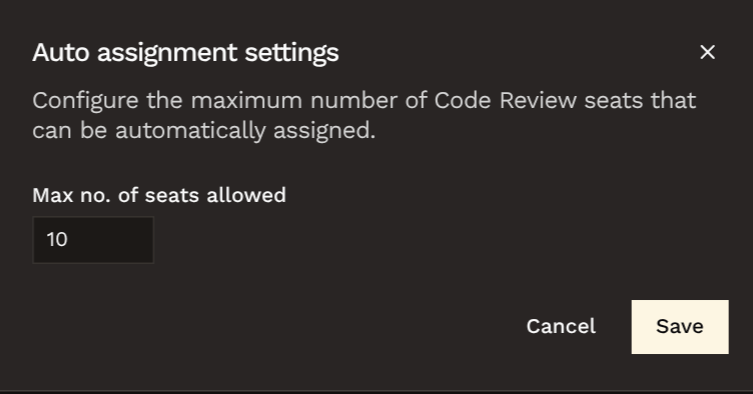
You can set a limit on the number of Code Review seats that can be assigned automatically.
By default, this limit is set to **50 seats**.
Go to **People**.
Open **Auto assignment settings** by clicking the cog icon next to
**Auto-assign on PR**.
Enter the maximum number of Code Review seats that can be automatically
assigned.
When a user signs in to Hacktron and links their GitHub or GitLab account,
their account will be reconciled with the auto-assigned seat.
## Configure the seat limit
You can set a limit on the number of Code Review seats that can be assigned automatically.
By default, this limit is set to **50 seats**.
Go to **People**.
Open **Auto assignment settings** by clicking the cog icon next to
**Auto-assign on PR**.
Enter the maximum number of Code Review seats that can be automatically
assigned.
 ## Assign seats manually
Use manual seat assignment when you want admins to choose exactly who is covered.
Go to **People** in the Hacktron Platform.
Use search, role filters, or the seat-type filter to find the organization
member.
Turn on the **Code Review seat** toggle for that developer.
If manual assignment mode is enabled and a developer without a seat opens a pull request, Hacktron does not review it. The pull request receives a comment explaining that the developer needs a Code Review seat.
## Inactive reassignment
When auto-assignment is enabled and the organization is at the configured capacity,
Hacktron can reassign an inactive Code Review seat to the developer who opened the pull request.
The default inactivity threshold is **30 days**. If no inactive seat is available,
Hacktron blocks the review and asks the organization to increase the seat limit or remove an existing seat.
## Remove a seat
Remove a Code Review seat when a developer no longer needs PR or MR review coverage.
The seat will still count towards the current billing period's seat count, but it can be reassigned to another developer.
To remove a seat, click on the red trash icon on the right of the row for the developer.
## Assign seats manually
Use manual seat assignment when you want admins to choose exactly who is covered.
Go to **People** in the Hacktron Platform.
Use search, role filters, or the seat-type filter to find the organization
member.
Turn on the **Code Review seat** toggle for that developer.
If manual assignment mode is enabled and a developer without a seat opens a pull request, Hacktron does not review it. The pull request receives a comment explaining that the developer needs a Code Review seat.
## Inactive reassignment
When auto-assignment is enabled and the organization is at the configured capacity,
Hacktron can reassign an inactive Code Review seat to the developer who opened the pull request.
The default inactivity threshold is **30 days**. If no inactive seat is available,
Hacktron blocks the review and asks the organization to increase the seat limit or remove an existing seat.
## Remove a seat
Remove a Code Review seat when a developer no longer needs PR or MR review coverage.
The seat will still count towards the current billing period's seat count, but it can be reassigned to another developer.
To remove a seat, click on the red trash icon on the right of the row for the developer.